Skip to content

Remote temperature monitoring over Wi-Fi or 4G

We supply complete remote temperature monitoring that puts every fridge, freezer, store, plant room and server room on one live dashboard, and raises the alarm by SMS or email the moment a temperature leaves its safe band. Battery-powered temperature tags fit in minutes with no wiring to the building, and a ZARC Gateway on site carries their readings over your Wi-Fi, over its own 4G or over Ethernet, so you can monitor temperature remotely from anywhere, at one site or hundreds.

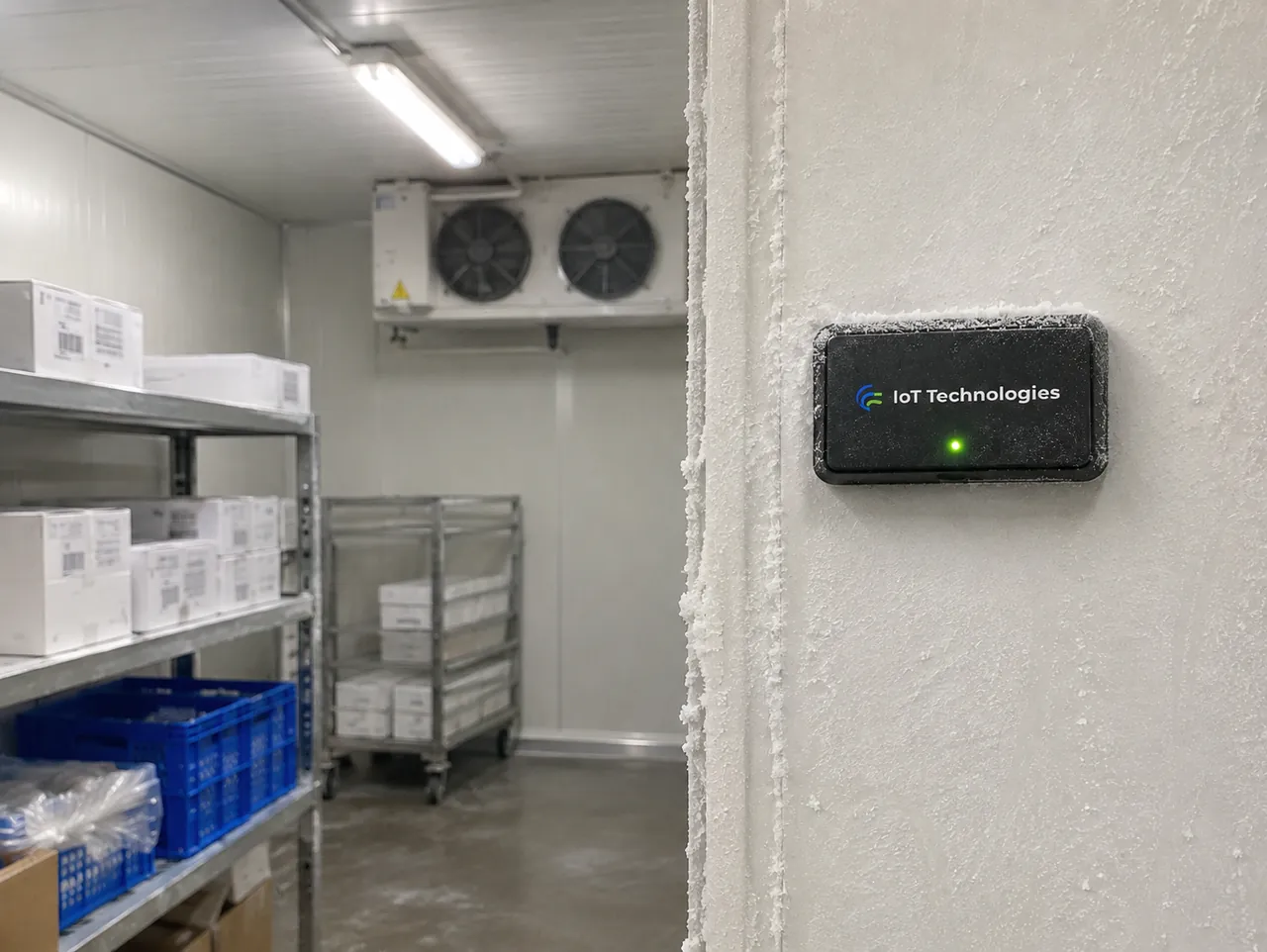
Illustrative: a remote temperature monitoring tag on the frosted wall of a walk-in freezer, with shelving and the cooling unit beyond

01

What it reports

A remote temperature monitor replaces the clipboard and the walk round. Each tag reads the air, a pipe surface or the inside of a cabinet through a probe, and reports on a regular cycle, every six to ten minutes as standard, with its current reading and its own health. Every reading is kept, so the record builds itself.

Temperature goes wrong in four ways, and each has its own alarm: too high, too low, rising faster than it should, or outside its band for longer than you allow. The duration limit is what stops a delivery or a defrost cycle from setting off a false alarm, while a door left open or a cooling unit that has stopped is caught while the stock, the medicine or the equipment can still be saved.

Wi-Fi temperature monitoring works through the gateway, not the sensors. The tags talk to the ZARC Gateway on 433 MHz radio, and the gateway joins your site Wi-Fi to reach the dashboard. Nothing in a freezer, a plant room or a basement has to join the network, there is no password on every sensor, and the Wi-Fi does not need to reach the places being monitored. Where there is no Wi-Fi, or the IT team would rather keep monitoring off the corporate network, the gateway uses its own 4G, 5G where the network offers it, or Ethernet.

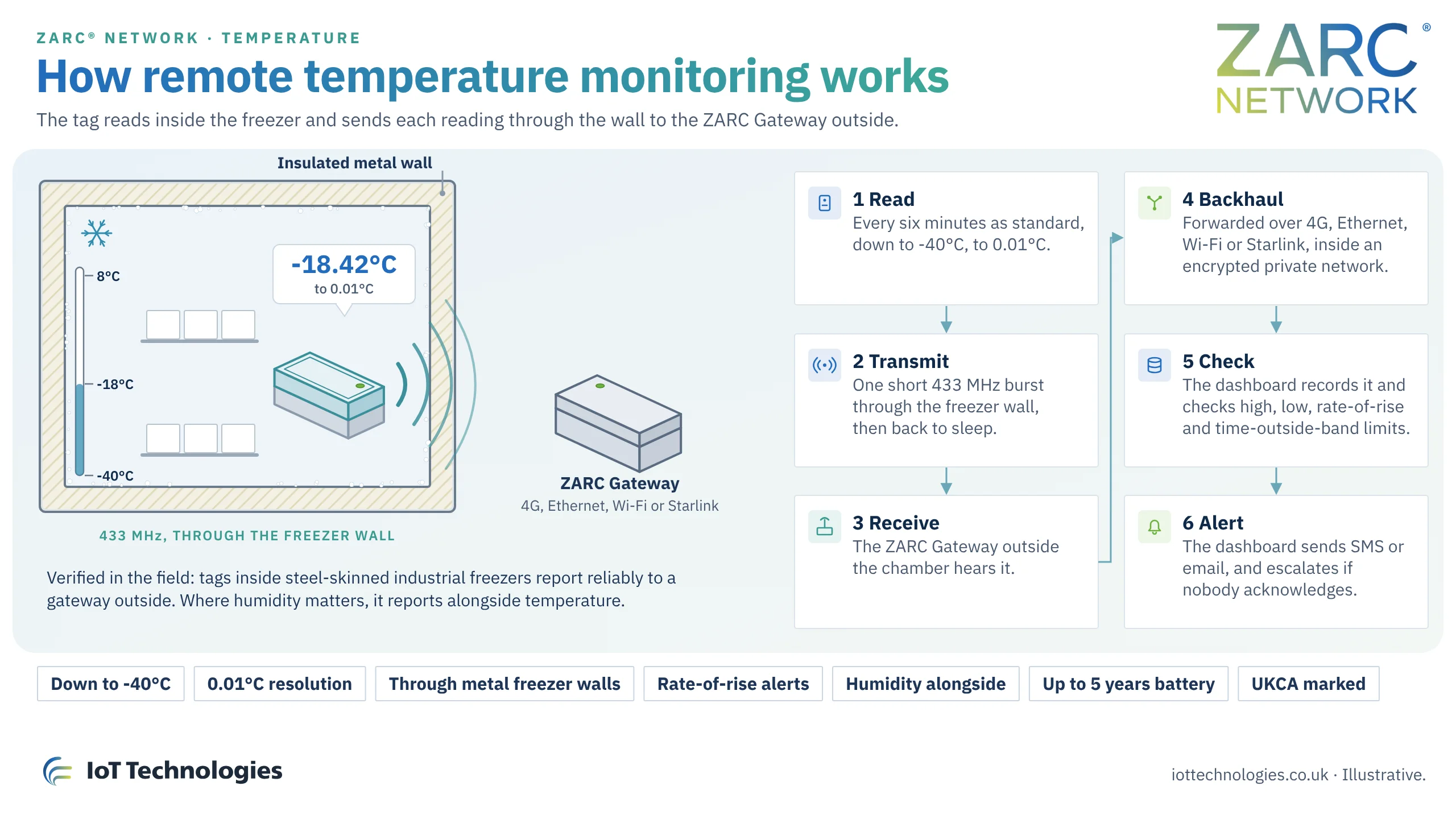
The tags are built for cold. A freezer probe reads down to -40°C and reports to two decimal places, a resolution of 0.01°C, so a slow drift shows on the trend long before it reaches a limit. The 433 MHz radio is a lower frequency than most wireless sensors use, and it carries reliably through the insulated metal walls of industrial freezers and cold rooms. That is verified in the field: tags inside steel-skinned freezers report to a gateway outside them. Where humidity matters, a humidity sensor reports alongside temperature on the same dashboard.

Every limit is configurable for each probe: the high and low thresholds, the rate of rise that counts as a rapid increase, the delay before an alarm, and who receives it by SMS or email at each time of day. Limits and recipients can be changed at any time from the dashboard.

The system is specified to the site: which rooms and units matter, the band each one must hold, how long a reading may sit outside it, and who is called during the day and at night.

02

Remote temperature monitoring: three ways to fit the sensor

Every installation follows the same pattern. A battery-powered tag reads the temperature, with its own sensor or through a probe pre-wired to it, and reports to the ZARC Gateway on 433 MHz. The dashboard holds the limits, raises the alert and keeps the record. What changes is where the sensor reads: inside a fridge or freezer, in the air of a room, or on the surface of a pipe.

What we deliver

  • A survey of every fridge, freezer, room and pipe to be monitored, and the band each must hold
  • The right sensor for each point: the tag's own sensor, an air probe, a buffered probe or a surface probe
  • Our own 433 MHz tag, designed in the UK, battery-powered with no wiring to the building
  • A ZARC Gateway on site, over Wi-Fi, Ethernet or 4G, with an optional battery backup where required
  • Fitting and commissioning, with every reading checked against a reference thermometer
  • Your dashboard: live temperature for every point, trends, minimum, maximum and time outside the band
  • High, low and rate-of-rise limits, with a delay you set so defrosts and deliveries do not raise false alarms
  • A no-contact alarm when a tag or gateway stops reporting
  • SMS and email alerts to the people you choose, with escalation if nobody acknowledges
  • A timestamped record that replaces the paper log sheet, kept for inspections and audits
01

Remote fridge and freezer temperature monitoring: a probe inside, the tag outside
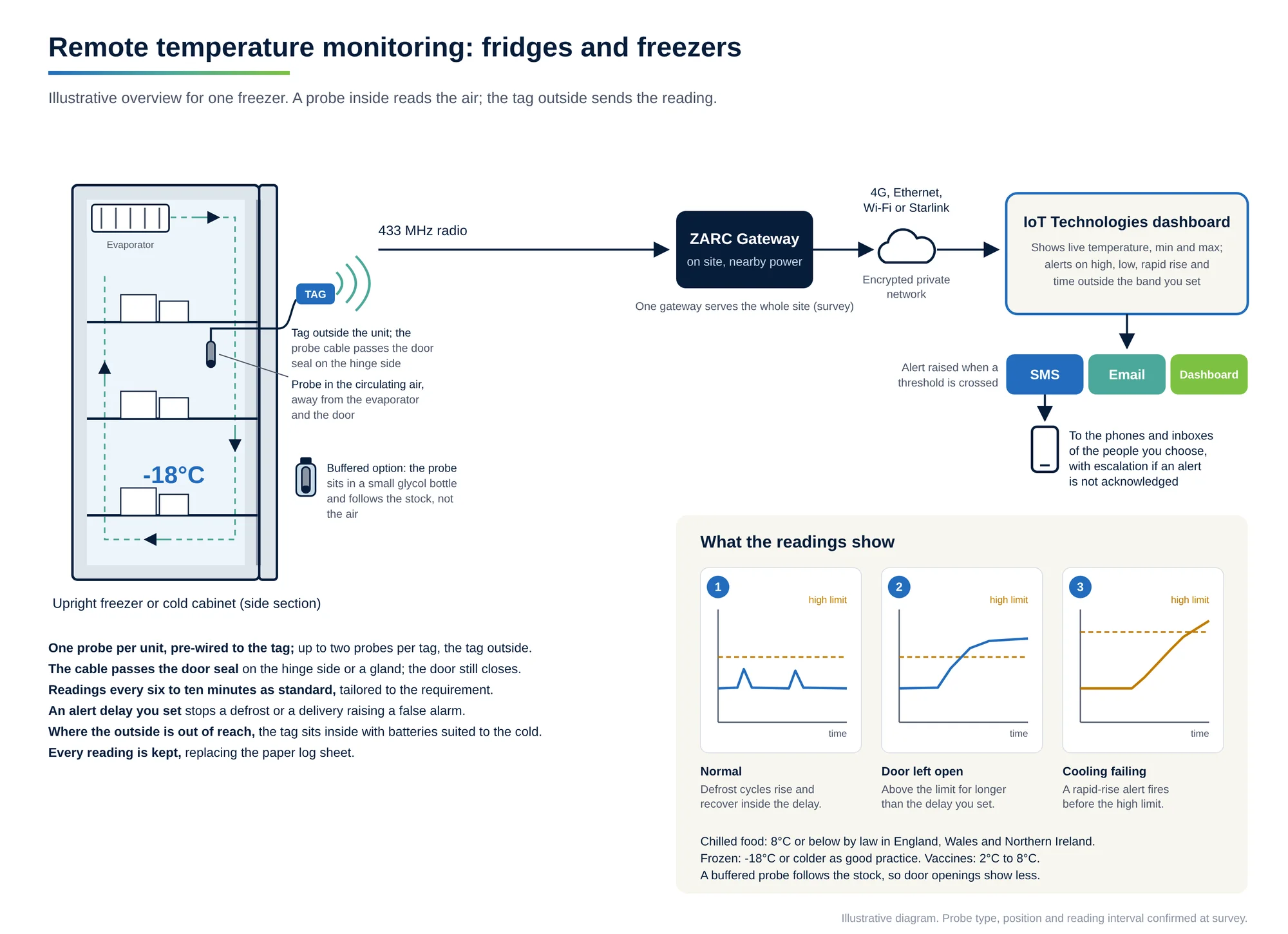
Illustrative diagram of remote fridge and freezer temperature monitoring: a probe inside an upright freezer reads the circulating air, away from the evaporator and the door; its cable passes the door seal to a tag outside, which reports on 433 MHz to a ZARC Gateway, then over 4G, Ethernet, Wi-Fi or Starlink to the IoT Technologies dashboard, which alerts by SMS and email on high, low, rapid rise and time outside the band. A buffered glycol probe follows the stock instead of the air.
Remote fridge and freezer temperature monitoring: a probe inside, the tag outside. Open full size
Illustrative diagram of remote fridge and freezer temperature monitoring: a probe inside an upright freezer reads the circulating air, away from the evaporator and the door; its cable passes the door seal to a tag outside, which reports on 433 MHz to a ZARC Gateway, then over 4G, Ethernet, Wi-Fi or Starlink to the IoT Technologies dashboard, which alerts by SMS and email on high, low, rapid rise and time outside the band. A buffered glycol probe follows the stock instead of the air.

A probe goes inside the fridge, freezer or chamber on a thin cable pre-wired to the tag. The cable passes the door seal on the hinge side, or a sealed gland where one exists, and the tag sits on the outside wall. Where reaching the outside is awkward, the tag goes inside the chamber with batteries suited to the temperature, and its 433 MHz signal carries through the insulated metal wall.

The probe sits in the circulating air, away from the evaporator outlet and the door. Air temperature moves quickly when a door opens or the unit defrosts, while the stock changes slowly. A buffered probe, set in a small bottle of glycol, follows the stock rather than the air, and an alert delay holds the alarm until the temperature has stayed out of band for the time you set.

Suits
Chilled and frozen food stores, upright and chest freezers, refrigerated display cabinets and static refrigerated containers, vaccine and pharmacy fridges, and walk-in freezers.
Watch for
The cable route must not stop the door sealing. A probe near the evaporator or the door reads colder or warmer than the stock. In a walk-in cold room the tag goes high on the wall by the door instead, the warmest point and the best radio path, with an alert delay so a delivery does not raise an alarm.
Accuracy
Set by the probe. A buffered probe gives the steadier picture of stock temperature; an air probe shows door openings and defrost cycles as they happen.
Installed cost
Low: one tag takes up to two probes, so two neighbouring units can share a tag.
Fitting
In service, without emptying the unit: probe placed, cable routed past the seal, tag on the wall.
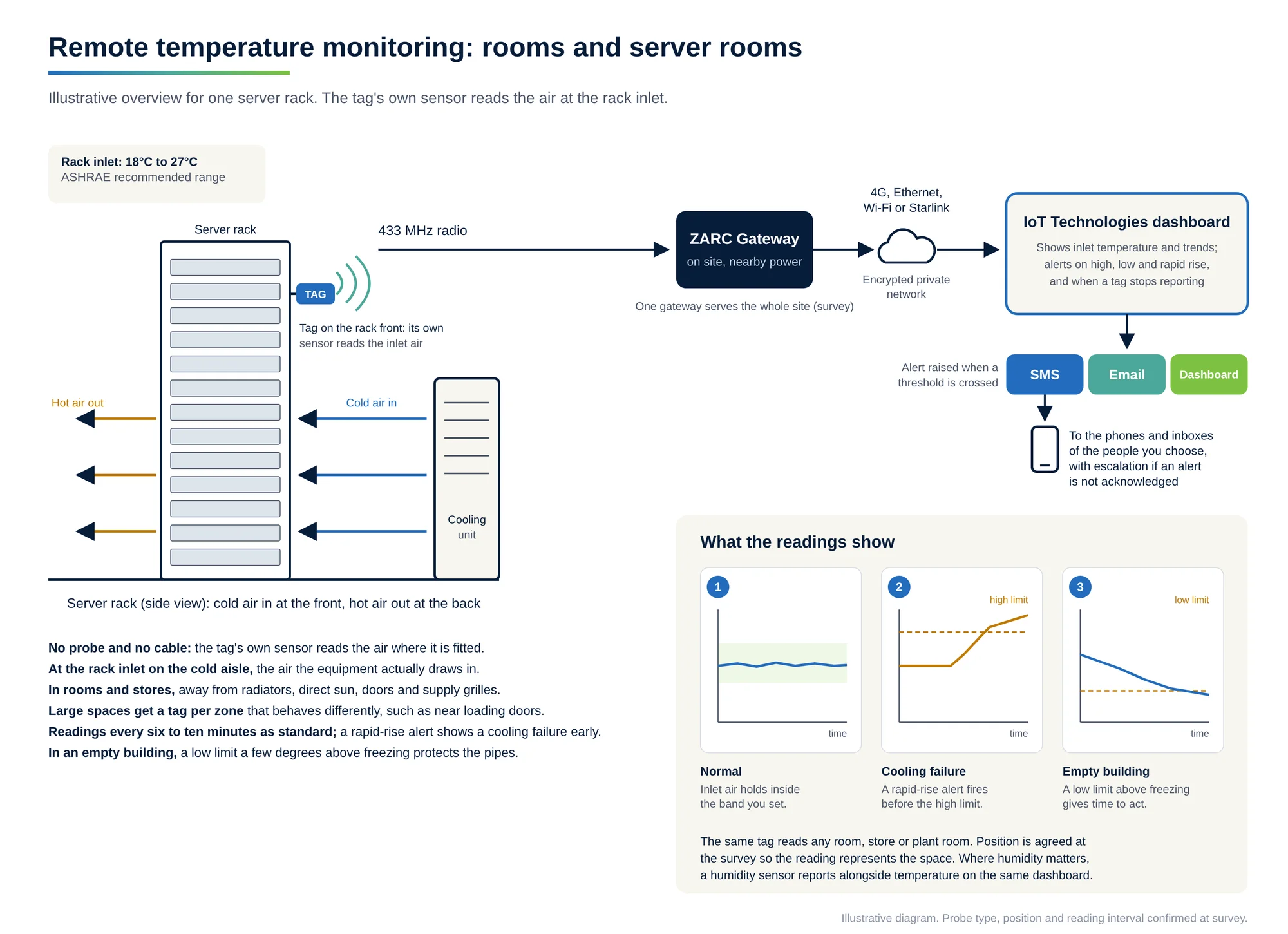
02

Room and server room temperature monitoring: the tag reads the air

Illustrative diagram of server room temperature monitoring: a tag on the front of a server rack reads the inlet air on the cold aisle, recommended 18°C to 27°C, while hot air leaves at the back; the tag reports on 433 MHz to a ZARC Gateway, then over 4G, Ethernet, Wi-Fi or Starlink to the IoT Technologies dashboard, which alerts by SMS and email on high, low and rapid rise, and when a tag stops reporting.
Room and server room temperature monitoring: the tag reads the air at the rack inlet. Open full size
Illustrative diagram of server room temperature monitoring: a tag on the front of a server rack reads the inlet air on the cold aisle, recommended 18°C to 27°C, while hot air leaves at the back; the tag reports on 433 MHz to a ZARC Gateway, then over 4G, Ethernet, Wi-Fi or Starlink to the IoT Technologies dashboard, which alerts by SMS and email on high, low and rapid rise, and when a tag stops reporting.

In a room, store or plant room, the tag's own sensor reads the air where it is fitted, so there is no probe and no cable. Position decides what the reading means: at a working height, away from radiators, direct sun, doors and supply grilles.

In a server or comms room the reading that matters is the air going into the equipment, so the tag goes at the rack inlet on the cold aisle, where ASHRAE's recommended range is 18 to 27°C. A rate-of-rise limit shows a cooling failure early. In an empty building, a low limit a few degrees above freezing gives time to restore heating before pipes freeze.

Suits
Server and comms rooms, plant rooms, warehouses and stockrooms, offices, wards, and empty or seasonal buildings.
Watch for
A tag beside a heat source or in sun reads the spot, not the room. Large stores need a reading in each zone that behaves differently, such as near loading doors and at high level.
Accuracy
Representative of the room only where the position is right, which is why positions are agreed at the survey.
Installed cost
The lowest of the three: the tag fixes to a wall or rack with no probe.
Fitting
Minutes per point, with no wiring and no work to the building.
03

Pipe surface temperature monitoring: a probe strapped to the pipe

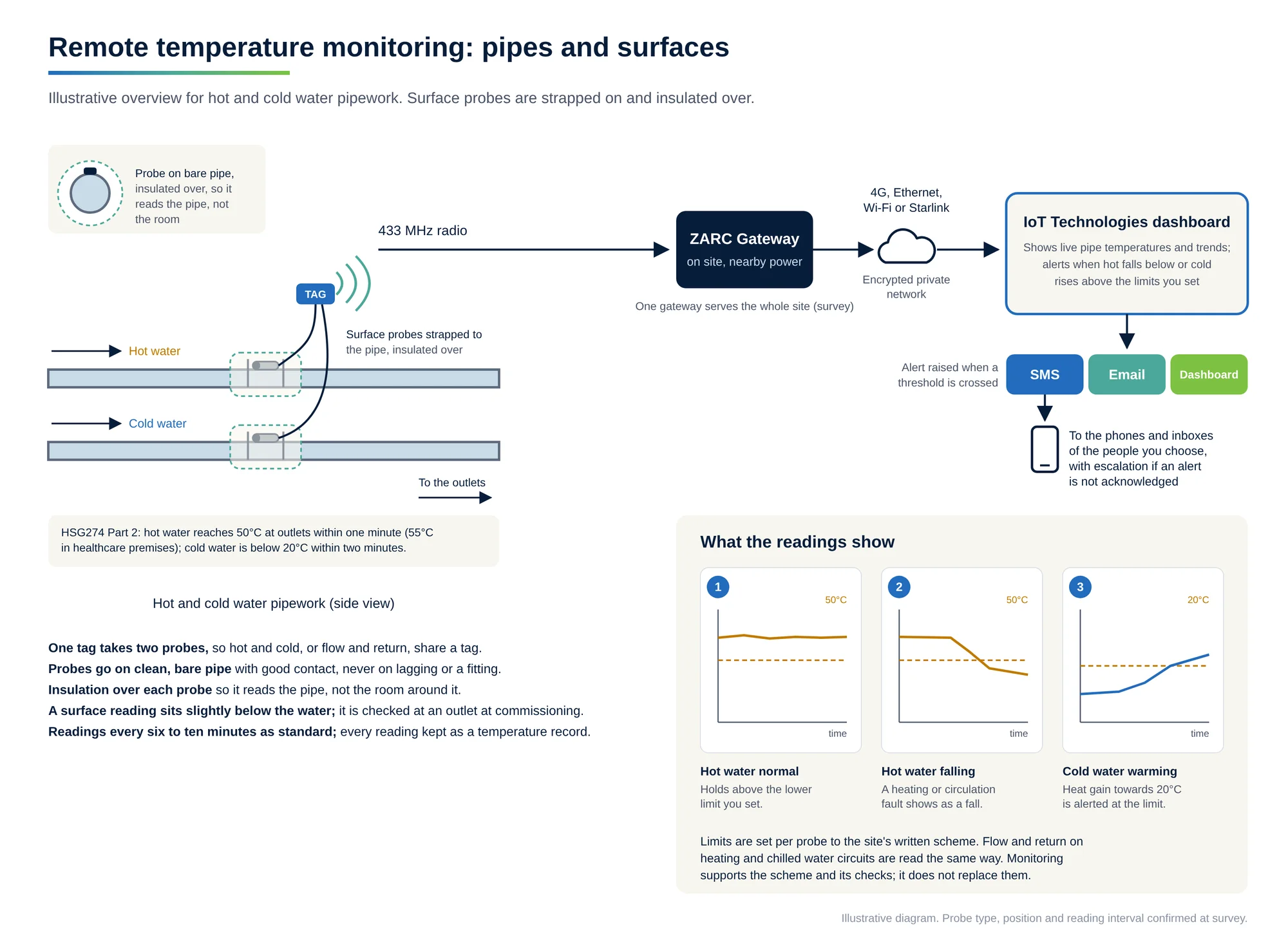
Illustrative diagram of pipe surface temperature monitoring: surface probes strapped to hot and cold water pipes and insulated over are wired to one tag, which reports on 433 MHz to a ZARC Gateway, then over 4G, Ethernet, Wi-Fi or Starlink to the IoT Technologies dashboard; it alerts by SMS and email when hot water falls below or cold water rises above the limits set, such as 50°C and 20°C under HSG274.
Pipe surface temperature monitoring: a probe strapped to the pipe and insulated over. Open full size
Illustrative diagram of pipe surface temperature monitoring: surface probes strapped to hot and cold water pipes and insulated over are wired to one tag, which reports on 433 MHz to a ZARC Gateway, then over 4G, Ethernet, Wi-Fi or Starlink to the IoT Technologies dashboard; it alerts by SMS and email when hot water falls below or cold water rises above the limits set, such as 50°C and 20°C under HSG274.

A surface probe is strapped to bare pipe with good thermal contact and insulated over, so it reads the pipe, not the air around it. One tag takes two probes, so flow and return, or hot and cold, can share a tag.

A surface probe reads slightly below the water inside and responds a little more slowly, so commissioning checks it against a thermometer at the outlet. On hot and cold water systems, HSG274 expects hot water to reach at least 50°C at outlets within a minute (55°C in healthcare premises) and cold water to fall below 20°C within two minutes. The record supports the written scheme and does not replace it.

Suits
Hot and cold water systems, calorifier flow and return, heating and chilled water circuits, and process pipework.
Watch for
An uninsulated probe reads the room. Probes go on clean, bare pipe, never on lagging or on a fitting.
Accuracy
Close to the water temperature with good contact and insulation; the offset is checked at commissioning.
Installed cost
Low: two probes per tag, with insulation over each.
Fitting
On a system in service, with no draining and no cutting into the pipe.
Remote temperature monitoring compared by installation
Compared onFridges and freezersRooms and server roomsPipes and surfaces
Where the sensor readsInside the unit, on a probeThe air where the tag is fittedThe pipe surface, under insulation
CableA pre-wired probe past the door sealNonePre-wired probes strapped to the pipe
Typical bandChilled 8°C or below; frozen -18°C or colder; vaccines 2 to 8°CServer inlet 18 to 27°C; frost protection a few degrees above 0°CHot 50°C or above; cold below 20°C
Main cause of false alarmsDoor openings and defrosts, handled by an alert delay or a buffered probeSun and nearby heat, handled by positionAn uninsulated probe reading the room
Fitted in serviceYes, without emptying the unitYesYes, with no draining
Probes per tagUp to twoThe tag's own sensorUp to two

Tags report every six to ten minutes as standard, tailored to the requirement, and the dashboard raises the alert when a reading crosses a limit, after any delay you set. Probe type and position are confirmed at the site survey.

Choosing the temperature sensor

Each point gets the sensor that reads what matters there, and the survey settles it before anything is fitted.

The tag's own sensor
Reads the air where the tag is fitted. Rooms, stores, plant rooms and rack inlets.
Air probe
Reads the air inside a fridge, freezer or chamber, with the tag outside. Shows door openings and defrosts as they happen.
Buffered probe
Set in glycol so it follows the stock rather than the air. Food stores and vaccine fridges.
Surface probe
Strapped to bare pipe and insulated over. Water systems, flow and return, process lines.

03

Applications

Remote temperature monitoring earns its place wherever a temperature that drifts unseen costs stock, money or a compliance record. These are the jobs we are asked about most, and the list is not exhaustive.

Fridges, freezers and cold rooms

Chilled food held at 8°C or below and frozen stock at -18°C or colder, in refrigerated cabinets, display units and static containers, watched around the clock with the record kept for food safety checks.

Medicine and vaccine fridges

Vaccines are kept between 2°C and 8°C. A fridge that drifts out of range overnight is known about before the morning clinic, with the minimum and maximum on record.

Server and comms rooms

Inlet temperature is usually held between 18°C and 27°C. A rate-of-rise alarm shows a cooling failure in minutes, before equipment trips on heat.

Hot and cold water systems

HSG274 guidance expects hot water at outlets at 50°C or above and cold water below 20°C. Pipe-surface probes read both, in support of the written scheme rather than in place of it.

Warehouses, stores and stockrooms

Temperature-sensitive stock across a whole building, with a record to hand when a customer, auditor or insurer asks.

Laboratories and process areas

Incubators, stores and process lines that must stay inside a narrow band, read at the surface or in the air.

Multi-site estates

Shops, kitchens, surgeries or depots across a region, each with its own limits and alarm routes, on one dashboard.

04

Where it can go

Each temperature tag runs on its own battery and needs no wiring to the building, so it goes where the reading matters. Typical positions:

Inside fridges, freezers and cold rooms

A probe inside the cabinet or chamber, or the tag itself inside: its signal carries through insulated metal walls.

On room walls

Reading the air in a store, office, ward, classroom or plant room.

On pipework

A surface probe clamped to hot water, cold water or process pipes.

Inside racks, panels and kiosks

At the inlet of a comms rack or inside an electrical enclosure.

In ducts and ceiling voids

A probe in the airstream of a supply or return duct.

Outdoors and in outbuildings

Tags rated IP68, in an enclosure specified to the location.

05

In the dashboard

Every probe at every site shows its live temperature on one board, grouped by site, building or room. Trends run from the last hour to the last year, and the dashboard works out the minimum, maximum and average over any period and how long each point has spent outside its band. The dashboard holds real-time and historical telemetry for compliance and audit, kept for as long as you need it, on our dedicated servers, your own servers, servers on site or the cloud. Readings and alarms can also pass to your BMS, CMMS or ERP through an API.

When a limit is crossed, the dashboard raises the alarm in real time and sends it by SMS, email or both to the people you name for that site, with escalation to further contacts if nobody acknowledges it and separate routes in and out of hours. An app is available on request.

  • Live temperature for every probe, at every site
  • High, low, rate-of-rise and time-outside-band limits per probe
  • Minimum, maximum and average over any period
  • Time spent outside the band, per point and per day
  • Alarm history with the reading that raised each one
  • Escalation when an alarm is not acknowledged
  • Records that export for food safety files, audits and insurers
  • Site-by-site comparison across an estate
  • A tag or gateway that stops reporting is flagged

06

Industries

Remote temperature monitoring is used in every sector that stores, treats, cools or protects something at temperature, including:

Healthcare

Medicine and vaccine fridges, wards and water systems.

07

Technical specification

Remote temperature monitoring over Wi-Fi or 4G: technical specification (part 1 of 2)
ParameterSpecification
What it monitorsAir, pipe-surface and in-cabinet temperature, through probes on the tag or on a cable
Low rangeReads down to -40°C
Resolution0.01°C
Through metalReports reliably through the insulated metal walls of industrial freezers and cold rooms, verified in the field
HumidityReported alongside temperature where a humidity sensor is fitted
Probes per tagUp to two, each with its own limits
ReportingEvery six to ten minutes as standard, set to the requirement, with the reading and the tag's own health
Alarm typesHigh, low, rate of rise, and time outside the band; every limit configurable per probe
AlarmsRaised by the dashboard in real time and sent by SMS or email, with escalation; app on request
Gateway backhaulWi-Fi or Ethernet where the site has them; 4G as standard, 5G where available; satellite where nothing else reaches
Wi-FiOnly the gateway joins the Wi-Fi; the tags stay on 433 MHz
Remote temperature monitoring over Wi-Fi or 4G: technical specification (part 2 of 2)
ParameterSpecification
Site internetNot needed: the gateway can carry its own 4G
Radio433 MHz, one-way from tag to gateway
RangeUp to 5 miles line of sight in good conditions; confirmed on site
Gateways per siteOne or more; every gateway hears every tag and duplicate readings are discarded
PowerBattery-powered tags, up to five years as standard; an optional battery backup for the gateway where required
IngressIP68
DashboardReal-time and historical telemetry for compliance and audit
DataKept for as long as you need it; our servers, yours, on site or the cloud
IntegrationAPI handoff of readings and alarms to a BMS, CMMS or ERP
ManufactureDesigned and manufactured in the UK
CertificationUKCA marked

08

From requirement to live alerts

Requirement

You tell us what is kept at temperature at each site, the band it must hold and who needs to know, day and night.

Configuration

We choose the probes, set the limits and durations for each point, and build the alarm routes and escalation.

Fitting

Tags go on walls or in enclosures, probes go into the fridge, onto the pipe or into the duct, and the gateway goes where its signal and power are best.

Commissioning

We check the first readings against a reference thermometer and send a test alarm to every recipient before handover.

Ready to get started? Every deployment starts with a conversation with one of our engineers.

Talk to an engineer

09

How it reports

Each temperature tag sends over 433 MHz radio to a ZARC Gateway on site. The gateway passes every reading to the dashboard over Wi-Fi, Ethernet or its own 4G, inside an encrypted, zero-trust private network. The dashboard checks each reading against its limits and raises the alarm. The tags only transmit and take no instructions, which is why they run so long on a battery and why nothing can reach them over the air.

Each point is two parts: the sensor or input that suits the job, and the ZARC tag we build it into, which carries the sensor's readings over our own 433 MHz radio to the ZARC Gateway and the dashboard.

Illustrative diagram of how remote temperature monitoring works: a tag inside a freezer reads down to -40°C, to 0.01°C, and sends each reading on 433 MHz through the insulated metal wall to a ZARC Gateway outside, which forwards it over Wi-Fi, Ethernet or 4G to the dashboard that checks the limits and sends SMS or email alerts.
Illustrative.

Temperature

The tag behind every reading: air, pipe and freezer probes.

Humidity

Where damp and condensation matter alongside temperature.

Remote temperature monitoring questions

What is remote temperature monitoring?

Remote temperature monitoring reads temperatures continuously at the places that matter and sends them to a dashboard you can see from anywhere. When a reading crosses a limit you set, the dashboard raises the alarm by SMS or email to the people you name.

Is this a Wi-Fi temperature monitoring system?

It runs over Wi-Fi where you want it to. The ZARC Gateway joins your site Wi-Fi and carries every reading to the dashboard. The temperature tags themselves talk to the gateway on 433 MHz radio, so they never need a Wi-Fi password or a signal inside a freezer or plant room.

Does it work without internet on site?

Yes. The gateway can carry its own 4G connection, so a site with no internet, or one where IT would rather keep monitoring off the network, still reports. Ethernet is available where the site prefers a wired connection.

How do I monitor temperature remotely across several sites?

Each site gets its own gateway and tags, and every site appears on one dashboard with its own limits and alarm routes. You see the whole estate in one place and compare sites side by side.

How quickly will I know about a problem?

Each tag reports every six to ten minutes as standard, or more often where needed, and the dashboard raises the alarm as soon as a reading crosses a limit. A rate-of-rise limit catches a cooling failure while the temperature is still climbing, before it reaches the high limit.

Will a door opening set off an alarm?

Not unless you want it to. A time-outside-band limit waits for a period you choose, so a delivery or a defrost does not raise an alarm and a door left open does.

How cold can it read?

Down to -40°C, which covers commercial and deep freezers, with a resolution of 0.01°C. Air and pipe-surface probes cover rooms, stores and water systems.

Will it report from inside a metal freezer?

Yes. The 433 MHz radio carries reliably through the insulated metal walls of industrial freezers and cold rooms, and this is verified in the field. The gateway sits outside the chamber and still hears every reading.

Can it alert on a rapid temperature rise?

Yes. A rate-of-rise limit raises the alarm when a temperature climbs faster than you allow, which catches a failed compressor or an open door before the high limit is reached. The rate, the delay and the recipients are set per probe.

Does it report humidity as well?

Yes, where a humidity sensor is fitted. Humidity shows beside temperature on the same dashboard, with its own limits and alarms.

Does it keep a record for food safety or audits?

Yes. Every reading and every alarm is kept as a timestamped record, held for as long as you need it, and exports for food safety files, audits, insurers and customers.

Do the sensors need wiring or mains power?

No wiring to the building. Each tag runs on its own battery for up to five years as standard, longer with additional cells, and any probe comes pre-wired to its tag. Only the gateway needs a power supply, and an optional battery backup is available for it where required.

Where should the probe go in a fridge or freezer?

In the circulating air, away from the evaporator outlet and the door, on a cable pre-wired to the tag. The cable passes the door seal on the hinge side, or a sealed gland, so the door still closes, and the tag sits on the outside wall.

What is a buffered temperature probe?

A probe set in a small bottle of glycol. The glycol adds thermal mass, so the reading follows the stock rather than the air, and a door opening or a defrost shows far less. It suits food stores and vaccine fridges, and we fit them where they are needed.

Where should a temperature sensor go in a server room?

At the rack inlet on the cold aisle, which is the air the equipment draws in. ASHRAE's recommended range for server inlet air is 18°C to 27°C. A rate-of-rise limit shows a cooling failure early, before equipment trips on heat.

Can it monitor hot and cold water pipe temperatures?

Yes, with surface probes strapped to bare pipe and insulated over, two to a tag. HSG274 expects hot water to reach 50°C at outlets within a minute (55°C in healthcare premises) and cold water to fall below 20°C within two minutes. The record supports the written scheme and does not replace it.

Can it send readings to our BMS?

Yes. Readings and alarms can pass to a building management system, CMMS or ERP through an API, alongside the dashboard.

What else can join the same system?

Once a site has its gateway, any other tag joins the same dashboard: humidity, door state, power failure, water leaks and more. The gateway is not limited to temperature.

Looking for something else?

We work with any sensor for any application.

Most sensing needs are met by a tag we already build, configured for your equipment. If yours needs a sensor or interface we don't list, we have the engineering to build it. Tell us what you need to measure, and we will tell you how we would do it.

Discuss your requirement

Discuss a monitoring
or alerting solution

Tell us what is happening on site, what you need to see, and the event you need to hear about. We will come back with the system that answers it.

Location

Venator House, Unit 9, 15-17 St Stephen's Road, Bournemouth

Dorset, BH2 6LA · VAT GB 409644484

Solutions contact

Contact the engineering team

Direct to the team that designs and builds the system. Tell us the sites and what is kept at temperature.

We'll only phone you if you choose phone as your preferred contact.

Preferred contact (optional)

Optional. Leave blank and we reply by email.

No mailing lists. No spam. We reply directly to your enquiry.